Encrypted Mobile Calls: Secure Setup for Individuals and Teams

Yes, you can make end-to-end encrypted mobile voice calls today. The technology exists, it works on both iOS and Android, and several options are free. The fastest path for most people is a dedicated app like Signal, which uses the Signal Protocol to encrypt voice calls so that only you and the person you’re calling can hear the conversation. No server in the middle can decode it.

Your best immediate options:

  • Signal (iOS and Android, free, cross-platform E2EE by default)
  • WhatsApp (iOS and Android, free, E2EE calls and messages by default)
  • FaceTime (Apple devices only, E2EE for one-to-one and group calls)
  • Google Fi Wireless (carrier-level E2EE for Android-to-Android Fi calls automatically)

CISA recommends using vetted secure messaging apps with E2EE and VoIP functionality as the baseline for private mobile communications. That guidance applies to individuals and organizations alike.


Key Takeaways

End-to-end encrypted mobile calls are available today through apps like Signal and WhatsApp, carrier-level features like Google Fi, and platform-native options like FaceTime — but encryption alone is not enough without verification and policy enforcement.

Point Details
E2EE apps are your fastest option Signal, WhatsApp, and FaceTime provide E2EE calls by default; both parties need the same app.
Carrier-level E2EE exists Google Fi automatically encrypts one-to-one Android-to-Android calls with a lock icon as confirmation.
Metadata is always exposed Call logs, timing, and routing data leak even on fully encrypted calls — plan accordingly.
Verification closes the MITM gap Compare safety numbers or security codes out-of-band to confirm you’re talking to the right person.
Eisim for organizational control Eisim’s cellular profile platform helps IT teams enforce approved calling configs, VPN policies, and audit compliance across a managed device fleet.

Table of Contents

How do encrypted mobile calls actually work?

End-to-end encryption (E2EE) means encryption keys live only on the communicating devices. No intermediate server holds a key that could decrypt your call. That is the critical difference from in-transit encryption, where a server decrypts and re-encrypts traffic as it passes through, meaning the service provider can technically access the content.

Most encrypted mobile calls travel over VoIP (Voice over Internet Protocol) rather than the traditional cellular voice circuit. Apps like Signal, WhatsApp, and FaceTime establish an encrypted VoIP channel over your data connection. The media itself is protected by DTLS-SRTP (Datagram Transport Layer Security over Secure Real-Time Transport Protocol), while signaling (call setup, routing) is secured by TLS, which provides encryption, integrity, and authentication for client-server communications.

Carrier-level E2EE works differently. Google Fi automatically encrypts one-to-one calls between eligible Android phones on the Fi network, with a lock icon and a unique ringtone confirming the encrypted state. The encryption happens at the carrier layer, not the app layer, so no separate app is required for Fi subscribers calling each other.

Traditional cellular voice (2G/3G/4G circuit-switched calls) uses over-the-air encryption between your phone and the cell tower, but the carrier network itself can access the call content. That is not E2EE. Metadata — who called whom, when, for how long, and from which cell tower — is logged regardless of which model you use.


How to make encrypted calls on iOS and Android right now

Choosing the right option

Before picking an app, consider three factors:

  • Interoperability: Does your contact use the same app? Signal requires both parties to have Signal. FaceTime requires both to be on Apple devices.
  • Metadata exposure: All apps log some metadata. Choose based on how much you trust the provider.
  • Ease of use: WhatsApp and FaceTime have near-zero setup friction. Signal requires a phone number but no additional account.

iOS: using FaceTime and Signal

FaceTime on iOS uses E2EE for audio and video calls between Apple devices. Open the FaceTime app, select a contact, and tap the audio or video button. No settings toggle is needed — E2EE is on by default for supported calls. For cross-platform calls (iOS to Android), FaceTime is not an option; use Signal or WhatsApp instead.

To use Signal on iOS: download Signal from the App Store, verify your phone number, and tap the phone icon on any contact’s profile. Signal will automatically use an encrypted VoIP call. Grant microphone permission when prompted.

Android: Signal, WhatsApp, and Google Fi

On Android, Signal and WhatsApp both provide E2EE calls out of the box. Install either from the Google Play Store, complete phone number verification, and call any contact who has the same app installed.

For Google Fi subscribers, E2EE activates automatically on one-to-one Android-to-Android Fi calls when both phones meet eligibility requirements. Watch for the lock icon on the call screen and listen for the distinct ringtone that confirms encryption is active. No extra configuration is needed.

Check these permissions on Android before your first encrypted call: microphone access for the calling app, Wi-Fi calling enabled if you’re on a weak cellular signal, and no VPN that might block the app’s media ports.

Pro Tip: To confirm a call is encrypted, compare the security code or emoji string shown in the app with your contact verbally or via a separate channel. Signal displays a safety number; WhatsApp shows a security code you can scan as a QR code or read aloud. If the codes match, you’re talking to the right person on an encrypted line.
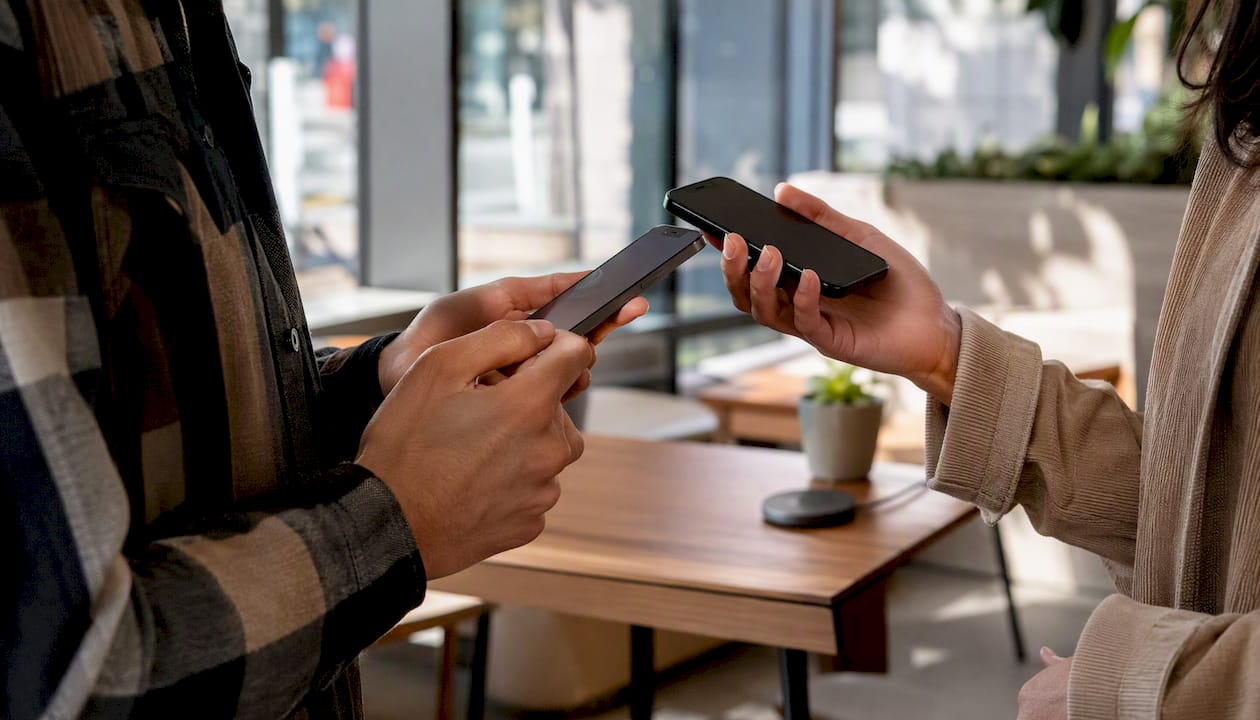
Hands verifying encrypted call codes on phones

When both parties can’t use the same app

If your contact can’t install your preferred app, your call will fall back to standard carrier voice, which is not E2EE. Plan ahead: agree on a shared app before a sensitive conversation. For organizations, this means publishing an approved-app list so teams know what to use before a call is needed.


What encryption does not protect — and where real risks hide

E2EE protects call content. It does not protect everything.

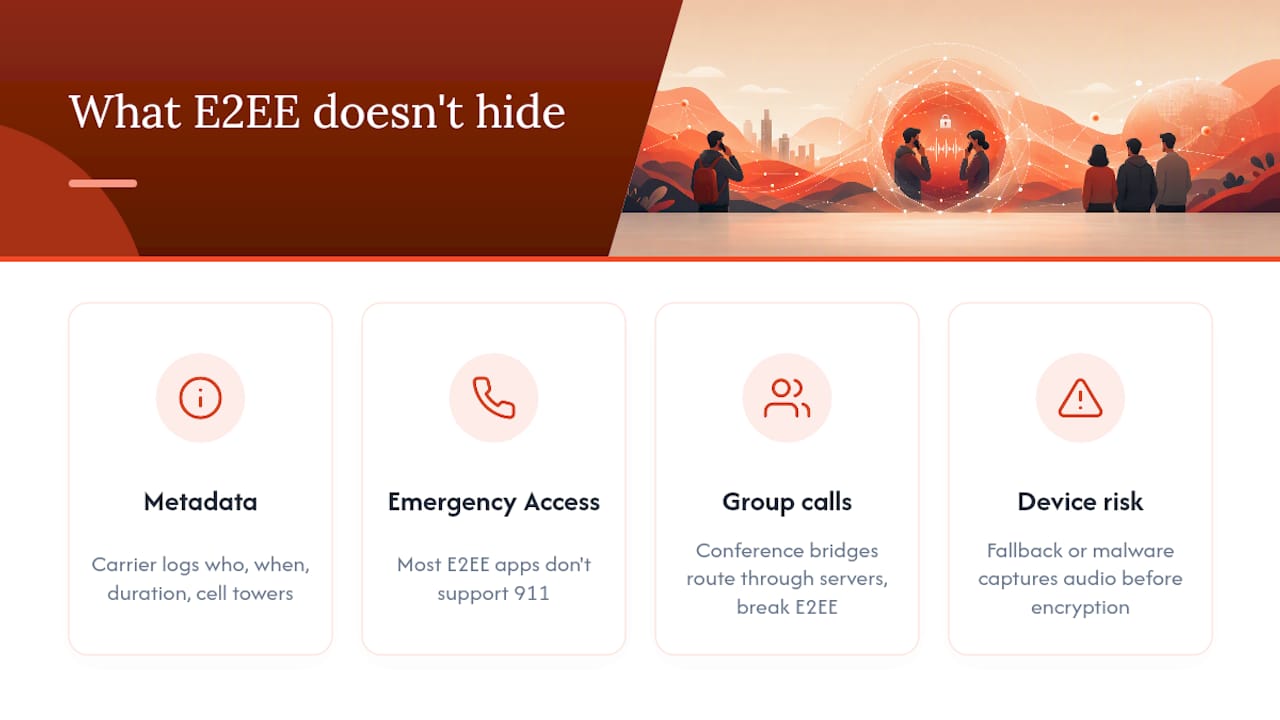
Metadata leaks regardless of encryption. Your carrier logs call records: who you called, when, how long the call lasted, and which cell towers were involved. App providers may log connection timestamps and IP addresses. This metadata can reveal sensitive patterns even when the content is perfectly encrypted.

Emergency services and lawful intercept. Encrypted VoIP calls through apps may not reliably reach 911. Most E2EE apps do not support emergency calling. If you rely on an E2EE app as your primary phone, you need a separate plan for emergencies. Lawful intercept requirements in the United States mean carriers must be able to provide call records to law enforcement under court order; E2EE apps that hold no keys cannot provide content, but metadata may still be accessible.

Group calls and conference bridges. Google Fi’s E2EE does not apply to group calls, forwarded calls, or calls to unsupported countries. WhatsApp group calls use E2EE, but the complexity of multi-party key management increases the attack surface. Conference bridges that route through a server break E2EE entirely.

Downgrade attacks and device compromise. If an attacker can force your app to fall back to an unencrypted connection, your call content is exposed. A compromised device is worse: if malware has microphone access, encryption is irrelevant because the audio is captured before it is ever encrypted.

What encryption does not protect — and where real risks hide — overview diagram

Which protocols secure your calls, and how do you verify the connection?

The protocol stack

Three layers of cryptography protect a typical E2EE voice call:

Protocol What it encrypts Typical deployment Verification available
Signal Protocol End-to-end call content and keys Signal, WhatsApp Safety numbers / security codes
DTLS-SRTP Media stream (audio/video packets) Most VoIP apps Fingerprint comparison
TLS / mTLS Signaling and call setup All VoIP systems Certificate pinning

The Signal Protocol handles the key exchange and message/call encryption at the application layer. It uses ephemeral keys — new keys generated for each session — so that a compromised key from one call cannot decrypt past or future calls. This property is called forward secrecy.

DTLS-SRTP encrypts the actual audio packets traveling across the network. ZRTP is an older alternative that also provides media encryption with a key agreement step that happens in-band during the call setup.

TLS secures the signaling channel — the part of the call where your app tells the server “I want to call this person.” Without TLS on signaling, an attacker could intercept or modify call setup even if the media is encrypted. The OWASP TLS Cheat Sheet recommends enforcing HSTS and strict cipher configurations to prevent downgrade attacks on these signaling channels.

How to verify you’re talking to the right person

Encryption alone does not prevent a man-in-the-middle (MITM) attack if an attacker substitutes their own keys during setup. Verification closes that gap:

  • Safety numbers (Signal): A 60-digit code derived from both parties’ public keys. Compare it with your contact via a separate channel — in person or by text. If it matches, no MITM is present.
  • Security codes (WhatsApp): A numeric code or QR code you can compare to confirm E2EE. WhatsApp’s verification process works the same way: scan each other’s QR codes or read the numbers aloud.
  • Emoji/fingerprint strings: Some apps display a short emoji sequence or fingerprint hash. Telegram uses cryptographic fingerprints for E2EE video calls to prevent MITM attacks.
  • Discord’s privacy codes: Discord’s E2EE for audio and video shows a green lock and privacy codes for verification; E2EE becomes mandatory for many call types starting March 2, 2026.
  • Threema IDs: Threema’s E2EE calls use Threema IDs rather than phone numbers, reducing metadata exposure and supporting verification without disclosing personal contact details.

How organizations should enforce encrypted calling across a team

Deploying E2EE calls at scale requires policy, technical controls, and user training working together. Here is a practical rollout sequence:

  1. Define an approved-app policy. Document which apps are permitted for voice calls (e.g., Signal for external calls, a managed VoIP platform for internal). Specify minimum OS versions required to run those apps securely.
  2. Configure MDM (Mobile Device Management) to enforce the policy. Use your MDM platform (Jamf, Microsoft Intune, or equivalent) to push approved apps, block unapproved calling apps, and enforce device encryption and screen lock requirements.
  3. Control microphone and VoIP permissions. Use MDM app configuration profiles to grant microphone access only to approved calling apps. Restrict or disable native carrier voice for sensitive roles where E2EE is mandatory.
  4. Force VPN for signaling on untrusted networks. Require a managed VPN when employees use public Wi-Fi, so signaling traffic is protected even before the E2EE layer activates. Apply OWASP’s TLS hardening recommendations to any server-side signaling infrastructure you control.
  5. Train users on verification. Run a short onboarding session showing staff how to compare safety numbers or security codes before a sensitive call. Document the verification steps in your security policy.
  6. Plan for emergency services. Publish a clear procedure: if an employee needs to call 911, they must use their native carrier dialer, not an E2EE app. This is non-optional and must be in writing.
  7. Establish incident response for suspected interception. Define what employees should do if they suspect a call was compromised: who to notify, how to preserve logs, and when to rotate keys or credentials.
  8. Audit and monitor compliance. Log which apps are installed and active on managed devices. Review MDM compliance reports monthly. Track whether users are completing verification steps for high-sensitivity calls.

Pro Tip: Design your calling policy so that encryption is the default and unencrypted calls require an explicit exception. Systems that require users to opt into security consistently underperform compared to systems where security is on by default and users must opt out. Force encryption; prevent downgrade.


The real priority most teams get wrong

Most organizations spend their energy picking the right app and almost none of it on verification. An encrypted call to the wrong person — or to someone whose device is compromised — is not a secure call. The app is the easy part. The hard part is building a culture where your team actually compares safety numbers before a sensitive conversation, knows what to do when the lock icon is missing, and has a documented fallback when an E2EE call is not possible.

For individuals, the calculus is simpler: install Signal, verify your contacts’ safety numbers once, and use it for anything you would not want a stranger to overhear. The usability gap between Signal and a standard phone call is small enough that there is no practical reason not to use it.

For organizations, the escalation path is clear. Start with an approved-app policy and MDM enforcement. Add verification training. Then, if your risk profile demands it, move to a managed cellular platform that gives you centralized control over calling configurations, VPN enforcement, and audit logging across your entire device fleet.


Eisim helps your organization deploy secure mobile communications

Picking the right E2EE app is step one. Managing it across 50, 500, or 5,000 devices is a different challenge entirely.
Eisim

Eisim’s cellular profile platform gives IT and operations teams a single place to configure approved calling apps, enforce VPN policies on managed devices, and audit compliance across your entire fleet. Instead of relying on individual employees to install the right app and enable the right settings, you push a verified configuration once and it applies everywhere. Eisim integrates cellular profiles, eSIM management, cloud storage, and CRM connectivity into one platform built for field teams, dispatch services, and organizations where secure voice communication is not optional.

Other valid routes exist: MDM-only deployments, carrier-managed solutions, and self-hosted VoIP platforms each have a place depending on your infrastructure. Eisim is the right fit when you need cellular-level control, not just app management, and when your teams operate in environments where connectivity and security have to work together without friction.

Ready to enforce encrypted calling across your team? Explore Eisim’s cellular profile solutions and see how quickly a managed deployment can replace a patchwork of individual app installs. You can also visit the Eisim blog for deeper guidance on eSIM management, VPN integration, and secure mobile deployments for field teams.

Sources


Article generated by BabyLoveGrowth

Business eSIM for IT and Procurement: Deploy, Secure, Scale

A business eSIM gives your company centrally managed, remotely provisionable mobile connectivity with predictable costs and fast onboarding. The practical next step: run an EID/IMEI audit on your device fleet, confirm OS-level eSIM support, and request a pilot from Eisim to validate fit before full deployment. Two proof signals matter most at this stage: SM-DP+ provisioning (the GSMA-standard server that pushes profiles over the air) and MDM/EMM integration (the management layer that ties eSIM control into your existing device policy engine).

TechCrunch reports that eSIM adoption accelerated recently because broader device compatibility and travel demand made remote provisioning and multi-network profiles more practical for enterprise IT teams. That shift is now a procurement reality, not a future consideration.

Key Takeaways

A business eSIM is the most direct path to centrally managed, remotely provisionable mobile connectivity for U.S. enterprise fleets, with Eisim offering the integrated platform that covers provisioning, billing, security, and MDM in one place.

Point Details
Start with a device audit Collect EIDs via *#06# or device settings before any vendor conversation to avoid compatibility surprises.
Pilot before full rollout Run a 10–20 device pilot for four weeks, tracking provisioning time, billing accuracy, and connectivity rate.
Ask the right cost questions Confirm proration, cost-center invoicing, and overage alert timing before signing any eSIM plan.
Verify security certifications Require SOC 2 Type II, audit logs, and a documented revocation SLA from every vendor you evaluate.
Eisim as the integrated solution Eisim combines eSIM management, VPN, CRM, and AI tools in one platform built for U.S. enterprise deployments.

Table of Contents

What is a business eSIM and how does it differ from consumer eSIM?

A business eSIM is an embedded SIM profile combined with a central management layer built for enterprise control. The physical chip is soldered into the device at manufacture. What makes it a business solution is the software layer above it: a management platform connected to an SM-DP+ server that issues, transfers, and revokes profiles remotely, without anyone touching the device.

The logical flow works in three steps:

  • Management platform / SM-DP+: Your admin console or vendor platform issues a profile and pushes it via the SM-DP+ server.
  • Carrier connectivity: The profile activates on the target network, binding the device to a specific plan and number.
  • Device profile: The end user’s device receives and stores the profile, ready to use with no physical SIM swap.

Consumer eSIM apps (like those on a personal iPhone or Android) let individuals scan a QR code and switch carriers. That is where the similarity ends. A corporate eSIM solution adds centralized billing across your entire fleet, role-based access control (RBAC) so only authorized admins can provision or revoke, enterprise SLAs with defined response times, and bulk provisioning that can onboard hundreds of devices in a single workflow. Consumer eSIM has none of those controls.

Why your business benefits from switching to eSIM

The case for eSIM for business is strongest when you look at what physical SIM logistics actually cost: procurement delays, courier fees for replacement SIMs, manual activation calls, and the security exposure of a lost card that stays active until someone notices.

Core benefits for decision-makers:

  • Centralized billing and reporting: All lines on one invoice, with cost-center tagging and usage breakdowns by team or region.
  • Faster onboarding: New hires or replacement devices get a live number in minutes, not days.
  • Roaming cost control: Admins set spend caps and data limits per profile before a traveler boards a flight.
  • Dual-number support: One device carries a local and a home number simultaneously, useful for road warriors and international teams.
  • Remote lock and wipe: A lost or stolen device loses its profile within seconds from the admin console, no courier required.
  • Scalability for temporary staff: Seasonal workers or contractors get a profile for the duration of their engagement, then it is revoked automatically.

The duty-of-care angle is underappreciated. Field teams in oil and gas, first response, and transportation depend on consistent connectivity for safety apps and dispatch communication. A profile that can be pushed or switched remotely means a team member in a dead zone can be moved to a better-performing carrier without returning to the office.

Pro Tip: Start your eSIM rollout with frequent travelers or a critical field team, not your entire fleet. Run the pilot for four weeks, enforce spend caps at the platform level from day one, and use the billing data from that group to build the cost model for your full deployment.

How do you check device and carrier compatibility before deploying?

Device compatibility is the most common deployment blocker. A thorough audit before you sign a contract saves weeks of rework.

  1. Collect EIDs and IMEIs. On most devices, dial *#06# to display the IMEI and EID. On iOS, go to Settings > General > About. On Android, Settings > About Phone. The EID confirms the device has an embedded SIM chip.
  2. Cross-reference vendor device lists. Apple, Samsung, and Google publish supported eSIM device lists. Confirm the specific model and firmware version, since some carrier-locked variants disable eSIM even on hardware that supports it.
  3. Check OS version requirements. iOS 12.1 or later and Android 9 or later are the general minimums, but enterprise MDM features often require more recent versions. Verify against your MDM vendor’s documentation.
  4. Confirm carrier network support. Not every U.S. carrier supports eSIM on every plan tier. Confirm that the carrier your vendor uses supports eSIM activation on your target plans, including any international roaming profiles.
  5. Test with a sample QR activation. Before bulk provisioning, activate three to five devices manually using a QR code from your vendor. Confirm the profile installs, the number is reachable, and data routes correctly.
  6. Flag country-specific restrictions. A small number of markets restrict eSIM use or require local registration. If your fleet travels internationally, check destination-country rules before assuming a profile will activate abroad.

The device audit is not a one-time task. As your fleet refreshes, new models enter and old ones exit. Build EID collection into your device procurement checklist so the data is always current.

How does enterprise eSIM provisioning and management work end to end?

The provisioning lifecycle has five stages, and understanding each one helps IT plan the right integration points.

Purchase and profile issuance: Your admin or vendor platform generates a profile tied to a specific carrier plan and number. The SM-DP+ server holds the profile in a ready state.

Remote provisioning: The device connects to the SM-DP+ server (over Wi-Fi or cellular) and downloads the profile. This can be triggered by a QR code scan, a push notification from your MDM, or an API call from your provisioning system.

Assignment and activation: The profile is assigned to a user or device in the management console. RBAC controls determine who can assign, modify, or revoke profiles.

Monitoring: Live dashboards show data usage, roaming activity, and spend per profile. Alerts fire when a device hits a defined threshold.

Revoke and transfer: When an employee leaves or a device is replaced, the profile is revoked remotely. The number and plan can be transferred to a new device without carrier intervention.

Integration points your IT team needs to plan for:

  • MDM/EMM APIs: Platforms like Microsoft Intune, Jamf, or VMware Workspace ONE can trigger eSIM provisioning events automatically when a device enrolls.
  • Billing system connectors: Export usage data to your ERP or finance platform for cost-center allocation.
  • RBAC configuration: Define admin tiers (global admin, regional admin, helpdesk) so provisioning authority matches your org structure.
  • Audit logs: Every profile action should be logged with a timestamp, admin ID, and device ID for compliance and incident response.
Feature eSIM Physical SIM
Deployment speed Minutes (remote push) Days (courier + manual activation)
Scalability Bulk provisioning via API One card per device, manual
Visibility Live usage dashboard Carrier bill, monthly lag
Profile revocation Instant, remote Requires physical retrieval or carrier call

What does a phased enterprise eSIM rollout look like?

Phased deployment reduces risk and gives your team time to validate billing, MDM integration, and user experience before committing the full fleet.

  1. Define pilot scope (weeks 1–2). Select 10–20 devices from a single team, ideally frequent travelers or field staff. Set measurable success criteria: provisioning time under 10 minutes, zero billing discrepancies, connectivity success rate above 95%.
  2. Stage and test devices (weeks 2–4). Collect EIDs, confirm OS versions, enroll devices in MDM, and activate profiles using QR or API. Run activation QA on every device before handing to users.
  3. Monitor and iterate (weeks 4–8). Review usage dashboards weekly. Validate that spend caps are enforcing correctly. Confirm billing reconciliation matches expected costs. Gather user feedback on connectivity quality.
  4. Small-scale rollout (months 1–3). Expand to 50–200 devices across two or three departments. Automate provisioning via MDM API. Train helpdesk staff on profile management and common troubleshooting steps.
  5. Full fleet migration (months 3–6). Roll out to the remaining fleet in batches. Maintain a physical SIM fallback for devices that fail eSIM compatibility checks. Decommission legacy SIM inventory as profiles go live.

Common pitfalls that derail projects: missing EID data at procurement, overlooked carrier-locked device variants, RBAC not configured before helpdesk staff start provisioning, incomplete MDM integration that forces manual activation at scale, and no documented fallback plan for devices that cannot activate remotely.

What do business eSIM plans typically cost?

Pricing for eSIM solutions for companies varies by model, and knowing the shapes helps you ask the right questions before signing.

  • Per-profile subscription: A fixed monthly fee per active profile, regardless of data consumed. Predictable for finance, but can be wasteful for low-usage devices.
  • Pooled data plans: A shared data bucket across all profiles. Efficient for fleets with uneven usage patterns, since heavy users draw from the same pool as light ones.
  • Per-MB billing: Pay only for data consumed. Cost-effective at low volumes, but can spike unpredictably for roaming-heavy teams.
  • Unlimited regional plans: A flat rate for unlimited data within a defined region (e.g., continental U.S. or North America). Simplifies budgeting for domestic fleets.
  • Enterprise-tier SLAs: Premium tiers that add dedicated support, faster incident response, and contractual uptime guarantees. Relevant for mission-critical deployments.
Pricing model Best for Billing cadence
Per-profile subscription Stable fleets with predictable usage Monthly or annual
Pooled data Mixed-usage teams, field and office blend Monthly
Per-MB billing IoT devices or low-data endpoints Monthly, usage-based
Unlimited regional Domestic road warriors, retail POS Monthly or annual
Enterprise SLA tier Mission-critical or regulated industries Annual contract

Questions to ask every vendor before signing: How is data proration handled mid-cycle? Can invoices be split by cost center or department? What is the dispute resolution process for billing errors? Are management and API fees included in the per-profile rate or billed separately? What triggers an overage charge, and how quickly are alerts sent?

What security and compliance controls should you verify?

Security for a corporate eSIM deployment is not just about the SIM. It spans the management platform, the data in transit, and your audit trail.

Key controls to verify with any vendor:

  • Remote profile revocation: Confirm the vendor can revoke a profile within a defined SLA window (ideally under 15 minutes) after a device is reported lost or stolen.
  • Encryption in transit: Profile delivery over SM-DP+ should use TLS 1.2 or later. Ask for the encryption standard in writing.
  • Audit logs: Every provisioning, modification, and revocation event should be logged with admin ID, timestamp, and device EID. Logs should be exportable for your SIEM.
  • RBAC: Granular role definitions prevent helpdesk staff from accidentally revoking production profiles or assigning plans outside their authority.
  • SOC 2 Type II certification: For U.S. enterprises, this is the baseline compliance signal. Ask for the report, not just the badge.
  • Data residency: Confirm where profile and usage data is stored. U.S.-regulated industries (healthcare, finance, defense contractors) may require domestic data residency.
  • Lawful intercept compliance: U.S. carriers and platforms must comply with CALEA. Confirm your vendor’s posture if you operate in regulated sectors.

During vendor evaluation, request penetration test reports from the last 12 months, the vendor’s incident response SLA, and their encryption standards documentation. Eisim publishes its data handling and privacy controls, which gives your security team a concrete starting point for due diligence.

Which teams and industries benefit most from eSIM?

The ROI from eSIM for businesses concentrates in a handful of high-value scenarios.

  • Corporate travel and road warriors: Profiles switch to local carrier networks abroad, cutting international roaming fees and eliminating the need to buy local SIMs at the airport.
  • Logistics and fleet connectivity: Drivers and dispatchers stay connected across carrier coverage gaps. Profiles can be pushed to replacement devices in the field without returning to a depot.
  • Retail POS devices: Store tablets and payment terminals get connectivity profiles provisioned remotely at store opening, with usage capped to prevent unauthorized data use.
  • Temporary and seasonal staff: Contractors receive a profile on day one and it is revoked automatically at contract end, with no physical SIM to recover.
  • IoT and monitoring devices: Remote sensors, healthcare monitoring equipment, and industrial endpoints benefit from over-the-air profile updates without a technician visit.

In U.S. field service, the practical gain is speed: a technician whose device fails gets a replacement provisioned before they reach the next job site. In transportation, the gain is visibility: fleet managers see data usage and connectivity status per vehicle in real time. In healthcare monitoring, the gain is reliability: a patient-worn device that loses connectivity can be switched to a backup carrier profile without clinical staff involvement.

How do you evaluate and choose a business eSIM provider?

The evaluation criteria that matter most to IT and procurement are not always the ones vendors lead with in their marketing.

Scored criteria to use in your RFP:

  • Device compatibility coverage: Does the vendor support your current device models and planned refresh cycle? Ask for a compatibility matrix.
  • MDM/EMM integration: Native connectors to Microsoft Intune, Jamf, or VMware Workspace ONE reduce manual provisioning steps. API-first vendors give you more flexibility.
  • Centralized billing and reporting: Can you get a single invoice with cost-center breakdowns? Can you export usage data to your ERP?
  • Security certifications: SOC 2 Type II at minimum. ISO 27001 is a strong secondary signal.
  • SLA and support tiers: What is the guaranteed response time for a critical incident? Is there a dedicated account manager for enterprise accounts?
  • Profile transferability: Can a profile move from one device to another without carrier intervention? What is the process and how long does it take?

Questions for IT: Does the API support bulk provisioning? What MDM platforms are natively integrated? How are profile conflicts handled when a device has both a physical SIM and an eSIM?

Questions for procurement: Is the contract month-to-month or annual? What are the exit terms? Are there volume discounts at defined fleet sizes?

Questions for finance: How are mid-cycle additions and removals billed? Can invoices be split by department or project code?

Red flags to watch for: No API (forces manual provisioning at scale), no consolidated invoicing (creates reconciliation nightmares), no audit logs (compliance exposure), and an unclear or slow revocation process (security risk for lost devices).

How does Eisim address the enterprise checklist?

Eisim maps directly to the evaluation criteria above. The platform combines eSIM management with cloud storage, VPN, CRM integration, and AI tools in a single cellular profile solution, which means your IT team manages connectivity and communication infrastructure from one place rather than stitching together separate vendors.

Feature alignment:

  • Device compatibility and provisioning: Eisim supports remote profile delivery for enterprise device fleets, with EID-based provisioning that fits into your existing MDM workflow.
  • Centralized billing: The platform is built for consolidated reporting, giving finance a single view of spend across all profiles.
  • MDM/EMM and API integration: Eisim’s architecture supports API-driven provisioning, so your MDM can trigger profile events automatically at device enrollment or offboarding.
  • RBAC and audit logs: Admin roles and provisioning events are logged, supporting your compliance and incident response requirements.
  • Security posture: Eisim documents its privacy and data handling controls publicly, and the platform integrates VPN and AI security tools as part of the core offering.
  • Enterprise SLA and support: Eisim targets business customers with support tiers designed for operational continuity, not consumer self-service.

For a recommended pilot, start with 10–20 devices from your field team or most frequent travelers. Track three metrics over four weeks: provisioning time from EID submission to active profile, billing reconciliation accuracy against expected costs, and connectivity success rate in your primary operating regions. Those three numbers will tell you everything you need to decide on a full rollout. Explore Eisim’s enterprise integration scenarios to see how other businesses have structured their pilots, then request a demo to walk through your specific device fleet and use case.

The deployment decision most teams get wrong

Most IT teams treat eSIM deployment as a connectivity upgrade. It is actually an operations change. The provisioning workflow, the RBAC structure, the billing integration, the revocation policy — these touch procurement, finance, HR, and security, not just telecom. Teams that run a narrow pilot with only IT involved often discover billing surprises or RBAC gaps at scale that could have been caught in week two with the right stakeholders in the room.

Start small, measure everything, and automate the provisioning trigger from your MDM before you expand. The technology is reliable. The process design is where deployments succeed or fail.

Eisim gives your enterprise fleet a connected edge

Your field teams, road warriors, and distributed offices need connectivity that keeps pace with how your business actually operates. Eisim delivers exactly that: a cellular profile solution that pairs enterprise eSIM management with cloud, VPN, CRM, and AI tools in one platform, purpose-built for U.S. businesses that cannot afford connectivity gaps or billing surprises.

Eisim

  • Centralized billing: One invoice, cost-center reporting, and usage visibility across every profile.
  • MDM/EMM API integration: Provisioning triggers automatically at device enrollment, no manual activation required.
  • Enterprise SLAs: Defined response times and dedicated support for mission-critical deployments.
  • Security built in: VPN, AI security tools, and documented privacy controls protect your data and your team.

Ready to see how Eisim fits your fleet? Request a demo or start a pilot and get your first devices provisioned in days, not weeks.

Sources

  • TechCrunch — eSIM adoption is on the rise thanks to travel and device compatibility

Article generated by BabyLoveGrowth

EiSIM Cellular Bundles

EiSIM Cellular Profile Solutions By: Social Fi Cellular Network
Trusted by 10,000+ customers

Make Business Simple & Smart

Elevate your business with unmatched tools for seamless, intelligent connectivity.

Trusted by teams at
Small Business Global
GlobalTech
Service Reps
10K+
Happy Customers
99.9%
Uptime
24/7
Support
50+
Countries
Features

Everything you need

Powerful features designed to help you succeed in the digital world

AI Security

Guard your data like Fort Knox.

Lightning Fast

Blazing speed to outpace competitors.

Insights Power

Smart analytics with actionable insights.

Global Reach

Connect anywhere, anytime, seamlessly.

Personal Privacy

Your business, your secrets, sealed tight.

24/7 Support

We're awake so you don't have to be.

Pricing

Simple, transparent pricing

Choose the plan that works best for you. All plans include our core features.

Essential Plan

Perfect for startups seeking digital growth.

  • Private AI Box
  • E-SIM
  • Business Phone Number
  • Link in Bio
Get Started
MOST POPULAR

Business Pro

Advanced features for ambitious enterprises.

  • Private AI Box
  • Review Tap Stands
  • AI Business Tools
  • E-SIM
  • CRM System
Get Started

Ultimate Suite

Comprehensive tools for complete connectivity.

  • Private AI Box
  • Review Tap Stands
  • AI Business Tools
  • E-SIM
  • CRM System
  • Appointment Booking
Get Started

Loved by thousands

See what our customers have to say

“Our sales tripled in six months! Incredible tools.”
J
Jamie L.
CEO
“Seamless integration and fantastic support. Highly recommend!”
A
Alex P.
Operations Manager
“The AI tools are a game-changer for our business!”
S
Sam T.
Marketing Director

Frequently Asked Questions

Everything you need to know about our products and services

Transform Your Business Now!

Embrace innovation with our stellar solutions.

Join Us
EiSIM Cellular Profile Solutions By: Social Fi Cellular Network

© 2026 EiSIM Cellular Profile Solutions By: Social Fi Cellular Network. All rights reserved.